 Caracara
Setup guide
Connect MetaTrader 4 to Caracara
You'll do this once per trading account, on the computer or VPS where MT4 runs. It takes about 5 minutes.
-
Download the EA
The EA (Expert Advisor) is the small program that runs inside MT4 and sends your numbers to Caracara. It only reads your account and never trades.
-
Put it in MT4's Experts folder
In MT4, click File then Open Data Folder.
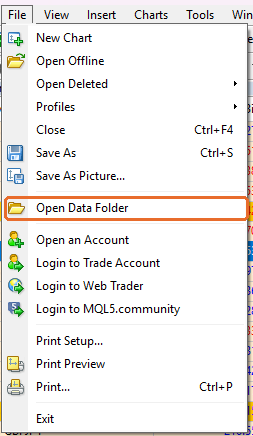
A folder window opens. Go into MQL4, then Experts, and move
MTWidget.ex4there.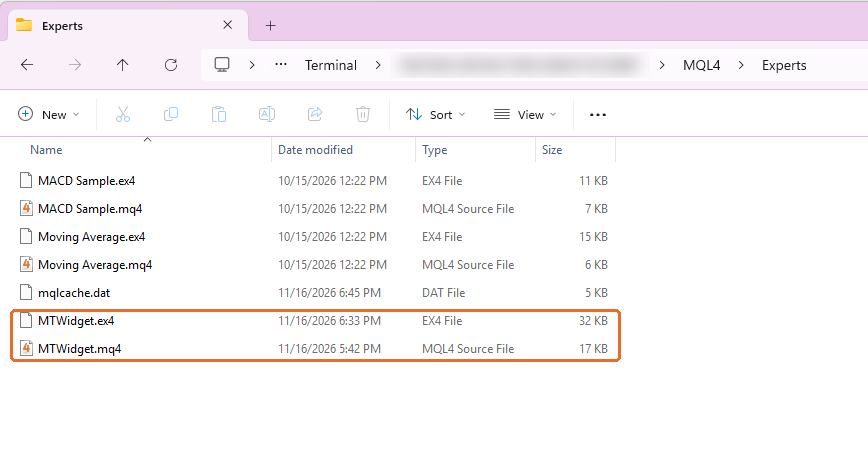
Yours may not have the .mq4 file next to it. That's fine, only the .ex4 is needed. -
Refresh the Navigator
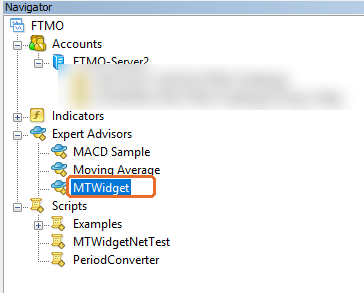
Back in MT4, open the Navigator panel (Ctrl+N), right-click Expert Advisors and choose Refresh. MTWidget appears in the list. Restarting MT4 also works.
-
Allow Caracara's server
MT4 blocks internet access for EAs until you allow an address. Click Tools, then Options, then the Expert Advisors tab:
1. Tick Allow WebRequest for listed URL.
2. Double-click add new URL and paste this address exactly:https://api.getcaracara.com3. Click OK.
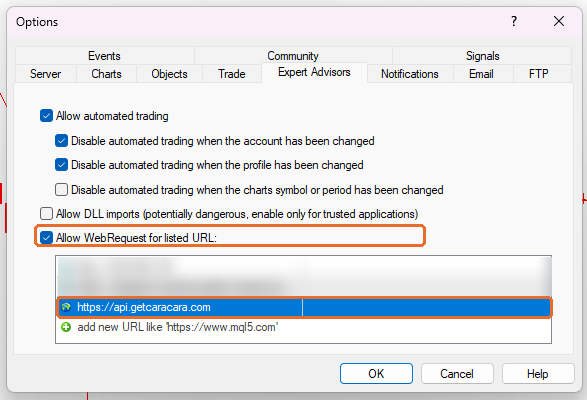
You don't need to tick Allow DLL imports. Caracara doesn't use DLLs, so leave it off.
-
Get a pairing code in the app
Open Caracara on your phone and tap Get pairing code. You'll see a code like K7Q-4M9. It's valid for 10 minutes and works once. If it expires, the app gives you a new one.
-
Attach the EA to a chart
Drag MTWidget from the Navigator onto any open chart. Any symbol and timeframe works, and one chart per account is enough. In the window that opens, go to the Inputs tab, double-click the value next to Pairing code and paste your code. Leave the other inputs as they are. Click OK.
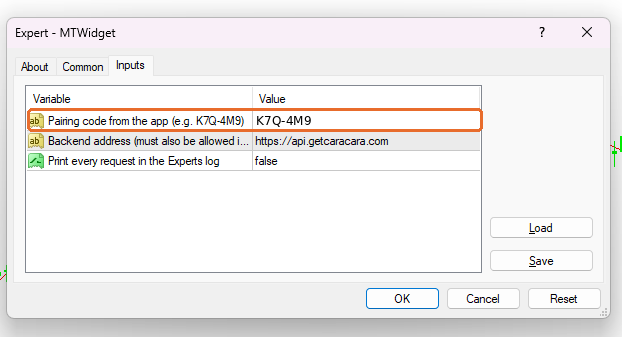
Within a few seconds the chart's top left corner says Paired with followed by an ID, and the app jumps to your dashboard. Now add the Caracara widget to your home screen: long-press an empty spot, choose Widgets, then Caracara.
Keep it running
Your phone shows the latest numbers MT4 sent. When MT4 is closed, the widget keeps the last values and shows when they were last updated. To stay current around the clock, run MT4 on a VPS. If MT4 restarts, the EA reconnects by itself and you don't need a new code.
If something's wrong
The EA writes its status in the chart's top left corner. More detail is in MT4's Toolbox (Ctrl+T), Experts tab.
| The chart says | What to do |
|---|---|
| Allow this address in Tools > Options > Expert Advisors | Step 4 is missing, or the address has a typo. It must be exactly https://api.getcaracara.com. |
| Pairing code invalid or expired | Get a new code in the app, then press F7 on the chart and paste it in Inputs. |
| Not paired | The code is empty. Press F7 on the chart and paste it in Inputs. |
| Can't reach the server | Check the computer's internet connection. The EA retries by itself. |
| Pairing lost | This account was paired again with a newer code, which disconnects older copies of the EA. If that wasn't you on purpose, get a new code and paste it in Inputs (F7). |
| This EA version is too old | Download the EA again from this page and replace the file from step 2. |
Nothing on the chart at all? Make sure MTWidget is attached: its name shows in the chart's top right corner.